Showing posts with label iPhone. Show all posts

Sunday, 15 June 2014

How to Remove BBM history / cache / unused files, etc

This guide difficulty is rated MEDIUM. No jailbreak needed though.
Need basic skills to use and browse computer folder and to operate computer applications.

Tools needed:
  1. PC/Mac
  2. iPhone/iOS device with BBM installed
  3. USB sync cable (30-pin cable or lightning cable - depends on your iPhone/iOS device)
Software needed:
  1. iTunes
  2. iFunbox

This guide is made using PC, with non-jailbroken iPhone 5 running iOS 6 with BBM app version 2.2.0.19.
For iOS 7, it should be pretty much the same.
For Mac users, the steps here should be pretty much the same as the PC.
For jailbroken iPhones users, the steps should also the same.

Before doing all these steps, please check your BBM App memory usage on your iPhone first:
1. Go to iPhone Settings > General > Usage.2. Wait until the storage calculation finished its loading then you will see per application memory usage.
3. Find BBM app, and take note of the memory its using right now or if needed, do a screen capture.

Originally after installed, BBM app is occupying more or less 60MBs of iPhone memory.
If after checking, BBM app memory usage is closer to 60MBs to 100MBs, then it is still just fine. You may not need to run below steps.
But just in case you are curious and want to free some space, please continue reading.

Here are the steps:
1. First thing first, connect your iPhone to your computer and let the iTunes open and detect it.
2. Close iTunes and open iFunbox. If you don't have the latest iFunBox, please update it as the new version (as this point of time is iFunBox version 2014) has nicer icons and is easier steps to do.
3. Once iFunbox opened and iPhone is detected, select the iPhone to open the apps interface.
4. On the apps interface, look and find BBM app.
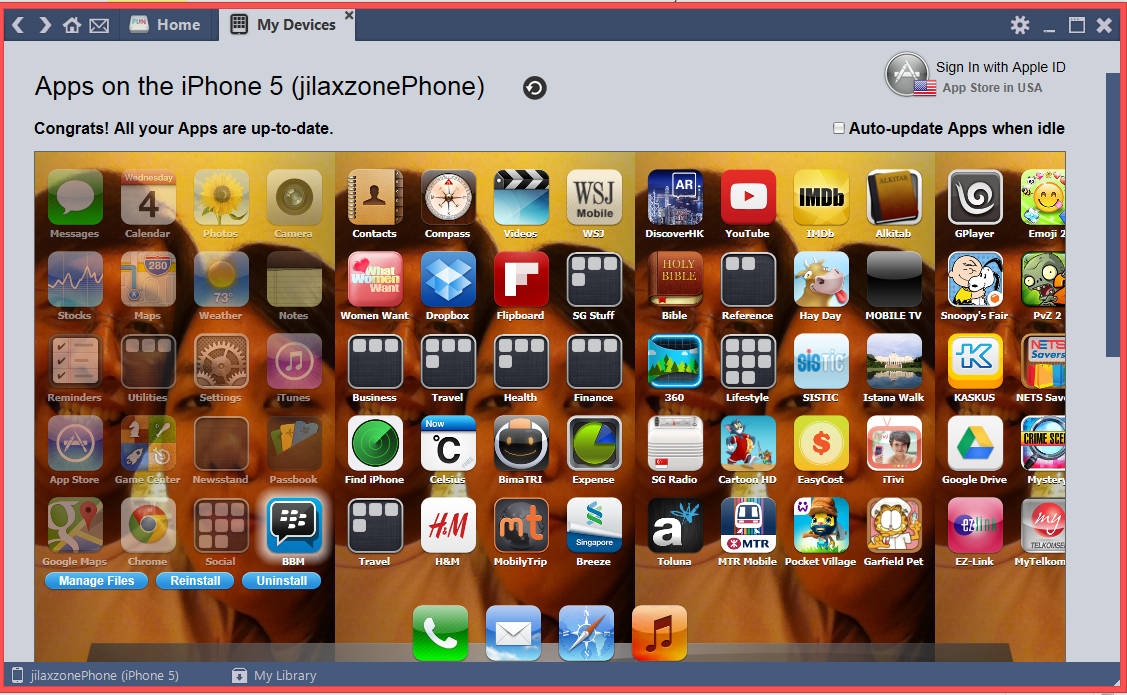
5. Click on the BBM app icon, and select "Manage Files". It will open the BBM App folder (just like the old iFunBox interface).


6. Continue with below steps.

To clear BBM app transfer cache, follow these steps:
If you ever wonder where this transfer cache is coming from, it is created when you transfer something to your contact(s), such as images.

Believe it or not, I found a few images where 1 image is 16MBs (on a iPhone 5). No wonder BBM use huge amount of your iPhone space.

1. Still on iFunBox with BBM App folder opened, navigate to Library > tmp > transfer

2. Click on the actions button, choose "Select All".
3. Click again on the actions button, this time choose "Delete" to remove all those files inside the transfer folder. Don't worry, nothing is going to be error after the deletion, so proceed to delete the files when prompted.

4. transfer folder cleared already.
5. Go to your iPhone Settings > General > Usage. Wait until the storage calculation finished its loading and check for BBM app memory usage.
6. If it's around 60MBs to 100MBs already, then that is good already.

If you require to claim extra space or if you didn't find so many in the transfer folder above, follow these steps below to clear images caches folder.
1. Still on iFunBox with BBM app folder opened, navigate to Library > Caches > images.

2. Check if there is any images inside the folder or not. If there is any and you want to get rid of them, click the actions button, and choose "Select All".

3. Click again on the actions button and choose "Delete" to remove all those files inside the caches > images folder. Again, not to be worry, nothing is going to be error after the deletion, so proceed to delete the files when prompted.

4. caches > images folder cleared already.
5. Go to your iPhone Settings > General > Usage. Wait until the storage calculation finished its loading and check for BBM app memory usage.
6. Hopefully by time now, it's around 60MBs to 100MBs or your satisfied numbers.

Hopefully this tutorial helps you guys freeing some space on your iPhone from those unused files.
And hopefully Blackberry will incorporate features to delete transfer/image caches directly from Settings menu inside the BBM app.

Cheers!

Saturday, 7 June 2014

Another update for BBM app for Iphone and iOS on 2nd June 2014

BlackBerry announced new update for its BBM app for Iphone and other supported iOS device at 2nd June 2014 ago. The update consists the followings, according to BlackBerry:


BBM App version 2.2.0.19:
  • Simple sign up for new BBM users
  • New sign in screen for existing BBM users
  • Improved experience for adding new BBM contacts by email
  • Updates tab has been re-named ‘Feeds’
  • 16 new emoticons
  • Bug fixes and performance improvements
So for those of you who until now still use the old version of BBM app, why not update your BBM app to the latest one? It's FREE (of course) and worth upgrading.

Here is the download link on the App Store:
https://itunes.apple.com/sg/app/bbm/id690046600?mt=8

After upgrading to the latest one, one thing directly noticeable is the new full screen BBM logo when first time opening the BBM app (if you couldn't find it that means you have it opened on the background, try to close the BBM app from the task manager and reopen it).
This is the new full screen BBM logo that appears everytime the BBM app open for the first time:


Also for the first time after updating to this version, you will be prompted to personalize your profile, asking you to give photo to your profile.


And another thing noticeable is the 3rd tab which is now renamed to "Feeds" where previously it was named as "Updates".


However the contents of "Feeds" (formerly "Updates") are the same: All, Contacts and Channels.

And "Updates" on the left menu is also updated to "Feeds" as shown below.
 

About performance improvements, do you feel the BBM app performance getting better and faster?
To me, I feel more or less the same as the previous version and even this version is slower to get to contact and start chatting compared to previous version because of the new full screen BBM logo that appearing every time this BBM app is started for the first time.

And if you are actually checking your iPhone memory usage, after quite sometime, depends on how active you are using BBM app for chatting/voice call and depends on how many contacts you have in your BBM, BBM app can and will grow from 50+MB (original size when installed) to almost 1GB!
You may want to check your usage by going through iPhone Settings app > General > Usage and find BBM app. You may be surprise on your finding.
So few things/features that current version of BBM app is still lacking are:
  • delete history, including chat, photo transfer
  • delete cache. your contact photos and previous photos (if they changed their photos) are kept by the BBM apps somewhere in your iPhone
Hopefully they (BlackBerry) will incorporate these features in their next release.
But don't worry, until that happen, I already find a way to reduce your BBM app size. So stay tuned because I'm compiling everything and will post it on future post. Thanks!

Wednesday, 19 February 2014

Blackberry has just launched an update for its BBM application for iPhone version 2.0.0.31

A bit late and old news for some, but Blackberry, on Feb 13, 2014 has just launched a new version of its BBM Messaging apps for iPhone and all the supported iDevices. The version stated as version 2.0.0.31.


If you haven't installed the new one, better to open your AppStore and install the update, as this update bring not only bug fixes but also new features which is good such as the-most-noticable one is the ability to do voice call using data, the rest as listed below:

New features:
1. Free voice call. You can make phone call via data (3G/LTE) or Wifi using BBM now. No video call at this point of time though.
2. Channels. To me, it's just like Facebook wall where you can post anything you wanted and your friends will be able to see them.
3. Better sharing options. Now you can share contact, photos, voice notes from your iPhone or linked dropbox account.
4. Live Location sharing


Saturday, 7 December 2013

Migrate your PIN contacts from Blackberry to Iphone


There are 2 ways to migrate your PIN contacts from your Blackberry device to your iPhone:
1. Migrate Automatically
2. Migrate Manually

How are we going to do it? Here it is...

1. Migrate Automatically

This step, migrate your PIN contacts automatically to your BBM for iPhone only works for newer generation of Blackberry device, from BB OS7 and up (please do correct me if wrong).
Because starting from OS7, BlackBerry (it was RIM), force us to create a BlackBerry ID and sign in with the BlackBerry ID when first time setup the BlackBerry OS7 device.
And later I found out that using this BlackBerry ID, I can easily migrate to a new device whenever I need to switch device.
And this way - using BlackBerry ID to easily migrate PIN contacts - is also working when you move from your BlackBerry device to use BBM application on iPhone (or any other iOS device).


Steps needed:

1. Make sure on your current BlackBerry device, you had your BlackBerry ID signed in
2. Install BBM for iPhone (or any other iOS device)
3. When configuring the BBM app for the first time, and asked to key in your BlackBerry ID, use your existing BlackBerry ID that is used in your BlackBerry device
4. Voila! When the configuration screen is gone, all your contacts is moved and migrated magically to your iPhone.
5. Done!

And then what happen to your old BlackBerry device, can it still be used? Can you have both contacts on both BlackBerry device as well as your iPhone?
Yes of course you can still use your BlackBerry device, RIM (now BlackBerry) will not just kill the device after you migrate to iPhone. But you will no longer have your existing contact there on your BlackBerry device.
Based on my test, you can only sign in using your BlackBerry ID once at a time.
Which means that you can't have both your contacts on your BlackBerry device as well as your iPhone, unless you do the 2nd step, which is to migrate the contacts manually.

So if after you signed in your BlackBerry ID to your iPhone and then sign it back to your BlackBerry Device, then your BlackBerry ID in your iPhone will be rendered offline and you can't use it to chat with your BBM contacts and vice versa.

So the point here is:

1. to migrate automatically and easily, you must have a BlackBerry ID
2. A BlackBerry ID can only signed in on 1 device at a time


2. Migrate Manually

This step, migrate manually is basically re-inviting all your PIN contacts to your new PIN in your iPhone by either scan the barcode or key in their PIN one by one.

If you have only a few contacts, or if you want to have your PIN contacts on both of your device or if you are using BB OS6 and below, you can use this manual way to migrate your contacts.

Steps needed:
1. Open your PIN contacts. and show the the PIN
2. On your iPhone, you can either Add by PIN or Add by Scan Barcode
3. If you choose Add by PIN, then key in the PIN and then Send the invitation, if you choose Add by Scan Barcode, scan the PIN barcode and then Send the invitation.
4. Wait for your contacts to accept you. Notify them if you are sending invitation from your new PIN
5. Do step 1 to 4 for the rest of your contacts
6. Voila! Now you have your contacts both on your BlackBerry device as well as your iPhone


Do let me know if you are having difficulties migrating your contacts.
Cheers!

BBM has finally arrived on iPhone!


On 21st September 2013, a moved that will be remembered by all humans (BlackBerry fans or used to be it) and also will be recorded in history...

BlackBerry Messenger was finally come to iPhone as well as Android platform.

If you follow the news back then, you must know that, the BlackBerry Messenger app or in short is BBM app, was only available on stores for less than 1 day and it was only available on New Zealand app store back then.

Sad for those who are late to download them, because no one knows that time, whether BlackBerry will eventually release the BBM app on the AppStore again sometime soon or will cancel their plan on bringing in the app to the iPhone world.

But after 1 month of waiting, at the same day, the 21st, but this time was October 2013, BlackBerry has finally launched the BBM App for iPhone and Android as well.

So Yay!
BBM App is now available for download in any AppStore worldwide and it's free!

Here is the link to the AppStore to download them:

https://itunes.apple.com/us/app/bbm/id690046600

Do let me know your experiences using the BBM app on your iPhone.
Or If you have problem in using it on your iPhone, please read the next post as I will try to cover every problems/issues I had with BlackBerry BBM app and share the solution or temporary solution to workaround the issue.

Cheers!